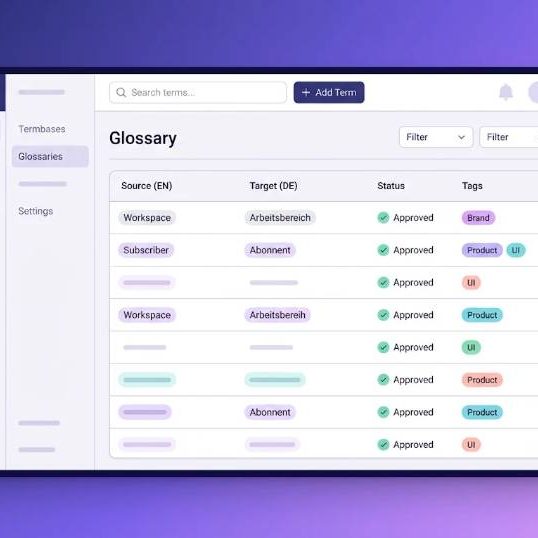
Terminology management software gives a company one approved place for names, phrases and product terms, so every translator uses the same wording in every language. For a PR and marketing agency like the team behind Polimedia, that matters every day: a campaign claim, a client brand name or a slogan has to read the same in Warsaw, Berlin and Madrid. Wordbeam, an AI translation management system, builds this control into the editor where translators already work.
This article explains what a term base does, how Wordbeam applies it, and how an agency can set one up in a single afternoon.
Why inconsistent terminology costs agencies money
Most marketing teams do not lose quality through big mistakes. They lose it through small drifts. One freelancer writes "customer journey" in full, another keeps it in English, a third invents a local phrase. Each version is acceptable alone. Together they weaken the brand voice and trigger extra review rounds.
Consistent terminology is a brand asset, not a linguistic luxury. When reviewers fix the same term again and again, the agency pays for the same correction many times. The usual costs look like this:
- Rework on client and product names that were already approved.
- Longer review cycles before every campaign launch.
- Mixed messages between markets.
- Slow onboarding for every new freelancer.
What a term base and glossary do in Wordbeam
The term base and glossary in Wordbeam stores approved terms for each concept across all your languages, with definitions, notes and forbidden terms. It works while people translate, not after the fact. Four features matter most:
- In-context term suggestions. Approved terms appear right where they apply, so translators use the correct wording without searching a spreadsheet.
- Automatic deviation flags. QA highlights any segment that ignores a glossary term before it ships.
- Import and export. Bring existing glossaries in and export them in the formats your team already uses.
- Multilingual entries. One concept, all your languages, in a single record.
That is the difference between a terminology database that sits in a shared folder and one that actively guides every segment.
Glossary management for a PR and marketing team
Start with the terms that carry the most risk: client and product names, legal disclaimers, taglines and industry words that already have an accepted local equivalent. A simple structure keeps the list short and useful.
| Term type | Example | Rule to store |
|---|---|---|
| Brand name | Client product name | Keep unchanged in every language |
| Slogan | Campaign tagline | Use the approved version per market |
| Industry term | Media relations | One approved equivalent per language |
| Forbidden term | Wording a client rejected | Flag it whenever it appears |
Add a short note to each entry, such as context or tone. Notes help translators choose correctly when one word has several meanings, which is common in advertising copy.
Working with freelancers and external agencies
Agencies rarely translate everything in house. Good translation vendor management starts with giving every linguist the same glossary and the same rules. When all of them open one term base, new translators inherit your terminology from day one and reviewers stop correcting the same words.
You can share the glossary with internal reviewers and external agencies inside the same workspace, so a client rule changes in one place and applies to everyone at once.
How terminology fits the wider translation workflow
Terminology works best next to other tools. Most computer-assisted translation systems pair a translation memory, which reuses earlier sentences, with terminology management software that controls individual words and phrases. Memory protects whole sentences. The term base protects the vocabulary inside them.
In Wordbeam the same editor also offers AI machine translation with engines such as GPT, Claude, Grok and DeepL. Machine output is fast, but it does not know your client's preferred wording. QA flags any segment that ignores a glossary term, so speed does not cost you brand accuracy. Content can also arrive through native connectors such as Figma, GitHub, GitLab, Contentful and AEM, so the same rules apply wherever the text lives.
Set up your first term base in five steps
- Collect the glossaries you already have from clients and past projects.
- Import them into the term base and merge duplicate entries.
- Add notes and forbidden terms for the riskiest wording.
- Invite translators and reviewers to the project.
- Review deviation flags every week and update entries as clients change their language.
Pricing and free trial
Wordbeam offers a free trial of 14 days and 10,000 words, which is enough to test glossary work on a real campaign before you commit. Paid plans start with the Freelancer plan at $25 per month for 100k words, followed by the Studio plan at $95 per month for 300k words.
Frequently asked questions
What is the difference between a glossary and a term base?
A glossary is usually a simple list of terms and their translations. A term base adds structure for each concept, including definitions, notes and forbidden terms.
Is glossary management only for large companies?
No. Even a team of three linguists repeats the same corrections without one. A small, well kept term base pays back after the first few projects.
How often should the glossary be updated?
Review it whenever a client changes a product name or tone of voice, and check deviation flags weekly during busy campaigns.
A shared term base turns brand language from a hope into a rule. Start with your ten riskiest terms, add them to Wordbeam and let the flags do the policing.